

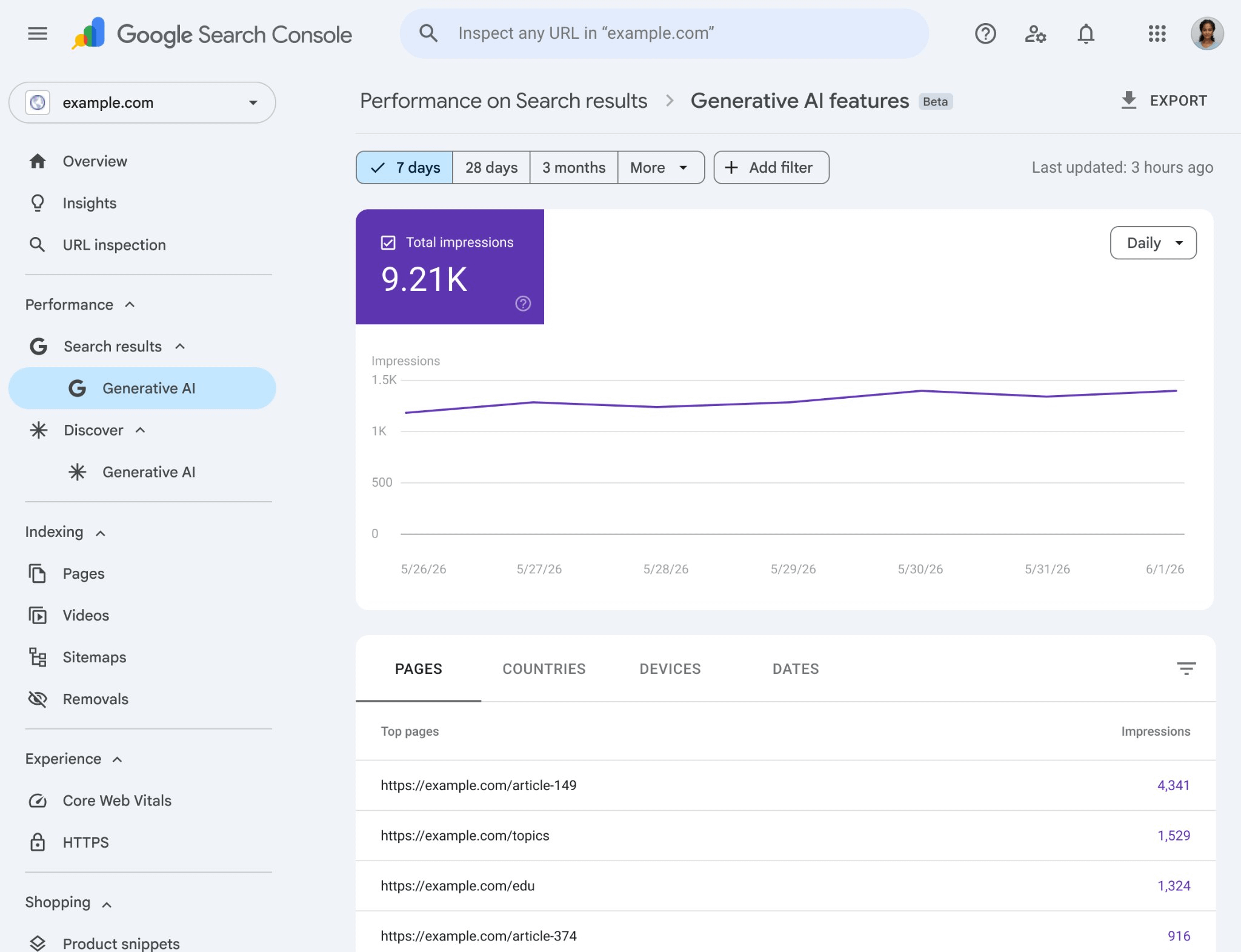
Google’s new Search Console reports for generative AI features show impressions from AI Overviews, AI Mode, and AI Overviews in Discover broken down by page, country, device, and time period.
What’s missing: clicks. The rollout is gradual (UK first), and the current data may only cover certain AI surfaces (e.g. non-personalised cards). Treat the numbers as directional, use them to identify pages already resonating with AI systems, and don’t make big decisions on impressions alone until click data appears.
Google’s new generative AI reports in Search Console
Google has begun rolling out new performance reports in Search Console focused on generative AI features. These reports track impressions from AI Overviews, AI Mode, and AI Overviews in Discover.While this is a welcome step toward greater transparency, the current version has some clear limitations.
What metrics are currently available
At the moment, the new Generative AI reports primarily show impressions.You can see how often your pages appear in AI-generated experiences across different surfaces (AI Overviews, AI Mode, and Discover). The reports break this data down by page, country, device, and time period (from hourly to monthly views in some cases).What’s missing so far: clicks. Google is not yet showing click data for these AI features in the new reports.Impressions yes, clicks no
You can see where your pages show up across AI Overviews, AI Mode and AI Overviews in Discover, sliced by page, country, device and time. What you can’t see yet is what those impressions actually convert to in clicks. Until that lands, the reports answer “are we visible?” but not “are we earning traffic?”
Rollout status: slow and limited
This is not a full, immediate rollout. Google has described it as a gradual release, starting with a subset of website owners. Early reports suggest it began in the UK before expanding further.From what I’ve seen so far, many site owners still don’t have access to these reports. This slow rollout is likely intentional. Google appears to be testing the data quality and presentation before making it widely available.
What data might be missing
There’s also some uncertainty about the scope of the data being shown.It‘s possible that the current reports are only capturing impressions from certain types of AI-generated content (for example, curated or non-personalized AI cards), rather than fully personalized AI experiences.
Google has historically been cautious about showing highly personalized data in Search Console, so this limitation wouldn’t be surprising.Until Google provides clearer documentation, we should treat the current numbers as directional rather than complete.
Directional, not complete If the data is missing the personalised slice of AI experiences, the total reported impression footprint may be materially smaller than the true one. Build your interpretation around that assumption until Google clarifies the scope.
Why Google isn’t showing clicks yet
The decision to show impressions but withhold click data is likely deliberate.If Google showed both impressions and clicks for AI features, many sites would see very high impression counts paired with extremely low click-through rates. This would make the performance of AI features look quite poor in many cases, something Google probably wants to avoid highlighting right now.By starting with impressions only, Google can give site owners some visibility into AI feature performance without immediately exposing how rarely users actually click through from these experiences.
How SEOs should start using this data
Even with the current limitations, these reports are still useful. Here’s how I recommend approaching them:
Step 1 — Waiting for the access
If you don’t have the reports yet, keep checking Search Console. Google is gradually expanding availability. Once it’s live for your property, you want to start building your historical baseline immediately.
Step 2 — Treat impressions as a leading indicator
High impressions in AI features tell you which pages Google considers relevant enough to cite. Use this to identify content that’s already resonating with AI systems.
Step 3 — Compare AI impressions vs traditional impressions
Look at how much of your overall visibility is now coming through AI surfaces versus classic blue links. This helps you understand the real shift in user behavior on the queries that matter to your business.
Step 4 — Don’t make big decisions on impressions alone
Until click data appears, avoid drawing strong conclusions about traffic or revenue impact from these reports. Impressions tell you about visibility, not value — and the gap between the two is exactly what’s hidden right now.
Step 5 — Monitor the opt-out decision more carefully
Now that you can see AI feature impressions and have the ability to opt out, you have better data to make that choice. Wait until you have a few weeks of data before deciding whether to remove your site from AI experiences.Use it as one data point, not the only one
The new reports are directional, not definitive. Pair them with your existing analytics, branded-search trends, and qualitative checks. The sites that get the most out of them are the ones treating them as a useful new lens, not as a single source of truth.
Bottom line
Google’s new Generative AI reports in Search Console are a step in the right direction, but they’re still in an early, limited state.
We’re getting impressions without clicks, and the full picture of personalized AI experiences is likely not yet visible.For now, use these reports as one data point among others, not as the sole basis for major strategic decisions.
The combination of the new opt-out control + these reports does give site owners more visibility and control than we’ve had before. That’s progress.Have you gained access to the new Generative AI reports in Search Console yet? What are you seeing so far? Always interested to compare notes.